
აღწერა
GCal Events List retrieves events from Google Calendar and shows data in a widget.
To make GCal Events List work properly, you have to activate the plugin and paste your Google Calendar API key and a public calendar ID in the widget admin panel.
It requires some other options. Here is the full list of params:
- Title (widget title)
- Calendar ID (you can find it in the option panel of your Google Calendar)
- Google API key
- Start from (a valid date in YYYY-MM-DD format)
- Max results
For a detailed description of calendar settings, read the Google Calendar Data API documentation
REMEMBER: your Google Calendar must be public, otherwise the widget won’t show any event!
ეკრანული სურათები
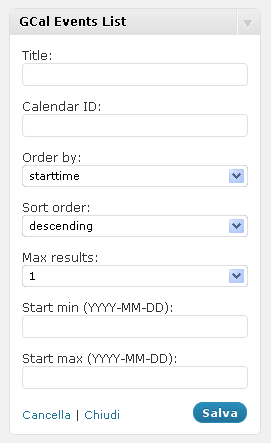
The widget admin panel 
The widget rendered in the front-end
დაყენება
- Extract gcal_events_list.zip
- Upload the plugin folder to the
/wp-content/plugins/directory - Activate the plugin through the ‘Plugins’ menu in WordPress
- Configure your GCal Events List widgets through the widgets admin page.
ხდკ
- Installation Instructions
-
- Extract gcal_events_list.zip
- Upload the plugin folder to the
/wp-content/plugins/directory - Activate the plugin through the ‘Plugins’ menu in WordPress
- Configure your GCal Events List widgets through the widgets admin page.
მიმოხილვები
There are no reviews for this plugin.
მონაწილეები & დეველოპერები
“GCal Events List” ღია პროგრამული უზრუნველყოფაა. შემდეგმა ადამიანებმა წვილი შეიტანეს მის განვითარებაში.
მონაწილეები
გადათარგმნეთ GCal Events List თქვენს ენაზე.
დაინტერესებული ხართ დეველოპმენტით?
დაათვალიერეთ კოდი, შეამოწმეთ SVN რეპო, ან გამოიწერეთ შექმნის ჟურნალი : RSS.
ცვლილებები
2.1
- Fixes several errors
2.0
- New version release
1.1
- Minor changes
1.0
- Fix: deprecated PHP4 style constructors in WP 4.3 read more
- Upgrade: support to Google Calendar API V3
0.1
- Initial plugin release