

აღწერა
The Buttons for makes it simple to create and manage beautiful, interactive buttons. Whether you need standard call-to-action buttons, floating action buttons, social sharing buttons, or print buttons, this plugin gives you full control over design, placement, and functionality.
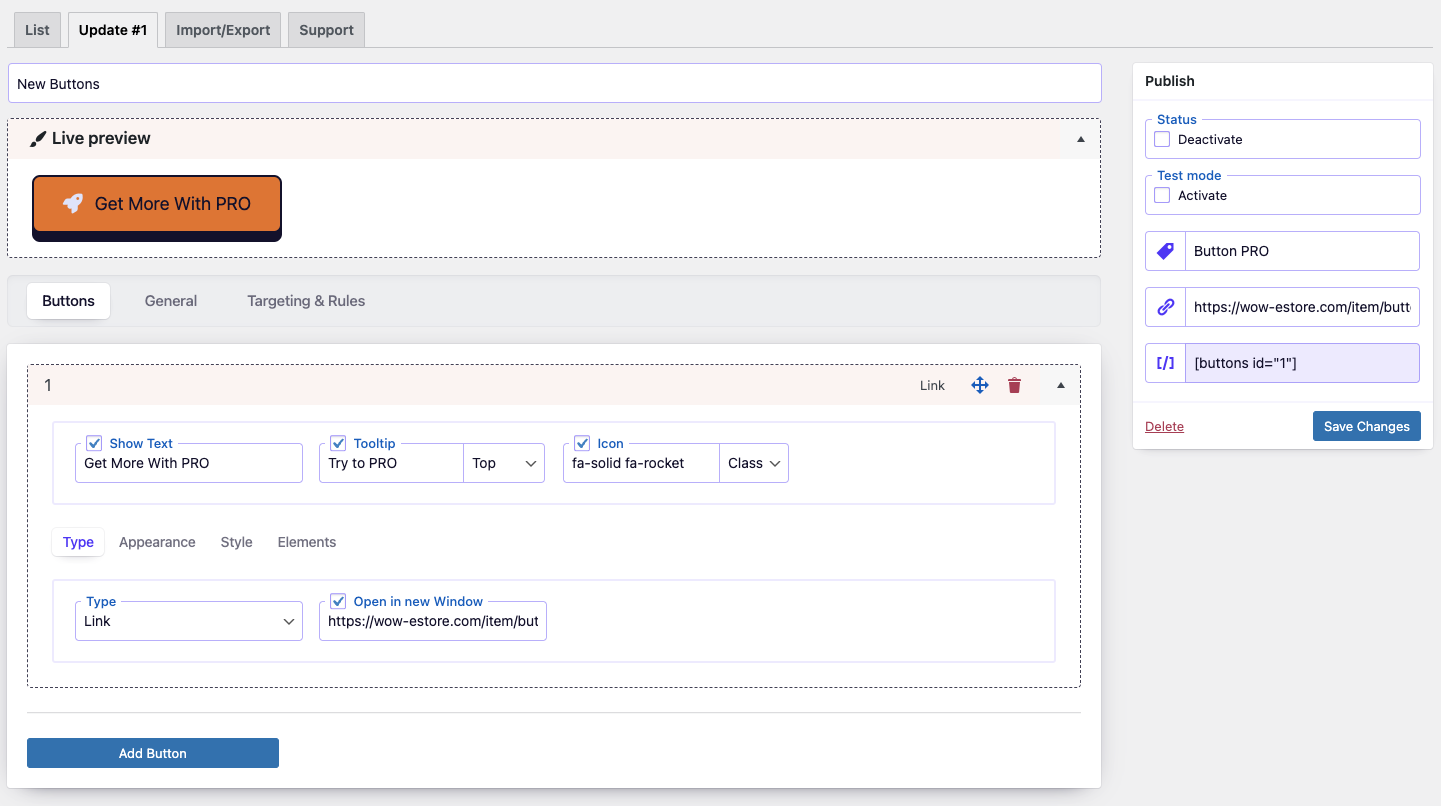
Customize your buttons with live preview, icons, and flexible styling. Place buttons anywhere — before/after content, inside posts with shortcodes, or fixed on the screen as floating buttons. Built-in social sharing and print features help you boost engagement, improve navigation, and make content more interactive.
Key Features
🎨 Design and Customization
- Live Builder Interface: Design and preview buttons in real time with an intuitive builder.
- Comprehensive Styling: Adjust colors, size, text, backgrounds, borders, and effects.
- Icon Integration: Use Font Awesome 7 or add custom icons.
- Flexible Placement: Insert buttons via shortcode, before/after content, or fixed on screen.
⚡ Enhanced Button Functionality
- Unlimited Buttons: Create as many buttons as your site needs.
- Duplication Tool: Save time by cloning existing buttons.
- Targeted Linking: Add login, logout, registration, password reset, or custom links.
- Social Sharing Buttons: Share content across Facebook, Twitter, LinkedIn, Pinterest, WhatsApp, and more.
- Print Button: Allow visitors to instantly print your pages with one click.
- Email Share Button: Let users send page links via email.
- Floating Buttons: Keep key actions visible while scrolling.
- One-Click Enable/Disable: Manage button visibility with ease.
- Test Mode: Preview buttons privately before publishing.
- Open Links in New Window: Control how links behave on click.
- Organized Navigation: Use custom tags to group and find buttons quickly.
The Buttons is an all-in-one tool for creating engaging, functional buttons in WordPress. From call-to-action and floating buttons to social share and print buttons, it helps you drive interaction, boost clicks, and improve user experience.
ეკრანული სურათები

დაყენება
In WordPress:
- Go to
Plugins>Add New> search forbuttons - Press
Install Nowfor the Button plugin - Press
Activate Plugin
Manual installation:
- Upload the
buttondirectory to the/wp-content/plugins/directory - Activate the plugin through the
Pluginsmenu in WordPress
ხდკ
-
Can I Use the Plugin on a Multisite Network
-
Yes, you can, but you need to activate the plugin separately on each subsite.
-
The Buttons plugin seamlessly integrates with Font Awesome, allowing you to effortlessly add thousands of beautiful icons to your buttons. Simply search the Font Awesome library (Font Awesome: https://fontawesome.com/icons) and use the icon class to incorporate it into your button design.
-
Support
-
Please use WordPress support forum to ask any query.Please use WordPress support forum to ask any query.
მიმოხილვები
There are no reviews for this plugin.
მონაწილეები & დეველოპერები
“Buttons – Build Floating, Social Share & Print Buttons Easily” ღია პროგრამული უზრუნველყოფაა. შემდეგმა ადამიანებმა წვილი შეიტანეს მის განვითარებაში.
მონაწილეები

გადათარგმნეთ Buttons – Build Floating, Social Share & Print Buttons Easily თქვენს ენაზე.
დაინტერესებული ხართ დეველოპმენტით?
დაათვალიერეთ კოდი, შეამოწმეთ SVN რეპო, ან გამოიწერეთ შექმნის ჟურნალი : RSS.
ცვლილებები
1.2
- Updated: Font Awesome library upgraded to version 7.1.
- Updated:
wp-color-picker-alphato version 3.0.4. - Fixed: minor bugs.
1.1
- Updated: Font Awesome library upgraded to version 7.0.0.
1.0.6
- Improved: Refactored AdminActions class for better performance and readability
- Improved: Reordered condition checks for better execution performance
- Updated: Added strict type hinting for method arguments in AdminActions
1.0.5
- Improved: Reorganized method order in DBManager class for better readability and maintenance
- Improved: Minor SQL formatting for consistency
- Cleaned: Minor code style improvements according to WordPress Coding Standards (WPCS)
1.0.4
- Fixed: class public/class-item-maker.php
1.0.3
- Fixed: Nonce verification logic for improved security.
Version 1.0.2
- Updated: FontAwesome Icons to version 6.7.1
- Updated: UI elements
- Fixed: menu icon
- Fixed: display on frontend
Version 1.0.1
- Fixed: Minor bugs related to escaping.
Version 1.0
- Initial release.