შიგთავსზე გადასვლა
WordPress.org

საქართველო

  • თემები
  • ჩადგმები
  • News
  • მხარდაჭერა
  • WordPress-ის შესახებ
  • ჩვენს შესახებ
  • Get WordPress
Get WordPress
WordPress.org

Plugin Directory

WP ShareX

  • Submit a plugin
  • My favorites
  • Log in
  • Submit a plugin
  • My favorites
  • Log in

ეს პლაგინი არ დატესტილა WordPress-ის 3 ძირითად ვერსიაზე. როგორც ჩანს, ის უკვე აღარ არის მხარდაჭერილი და შესაძლოა არ იყოს თავსებადი WordPress-ის მიმდინარე ვერსიასთან.

WP ShareX

ავტორი: joomdev
ჩამოტვირთვა
  • დეტალები
  • მიმოხილვა
  • დაყენება
  • დეველოპმენტი
მხარდაჭერა

აღწერა

WP ShareX is an advanced WordPress Social Share plugin enables you to add social share buttons on Posts and pages. You can assign buttons on Top of the Content, Bottom of the Content, Sidebar and on media.

Features of WP Social Share by JoomDev
1. 24 Social Network
2. You have the option to select either Icons or Icons with Text
3. 3 Button Shapes
4. 4 Button Animations
5. URL Shortening Option with Bitly and Goo.gl
6. Embed Twitter Handle and desired tags with Tweet
7. 4 Button display Location e.i. Top of the Content, Bottom of the content, Media, and Sidebar
8. Hide On Mobile Ability
9. Default Share Count Option. (You can play with your user’s mind)
10. Encourage your Audience to share your content with Share Incentive Feature

ეკრანული სურათები
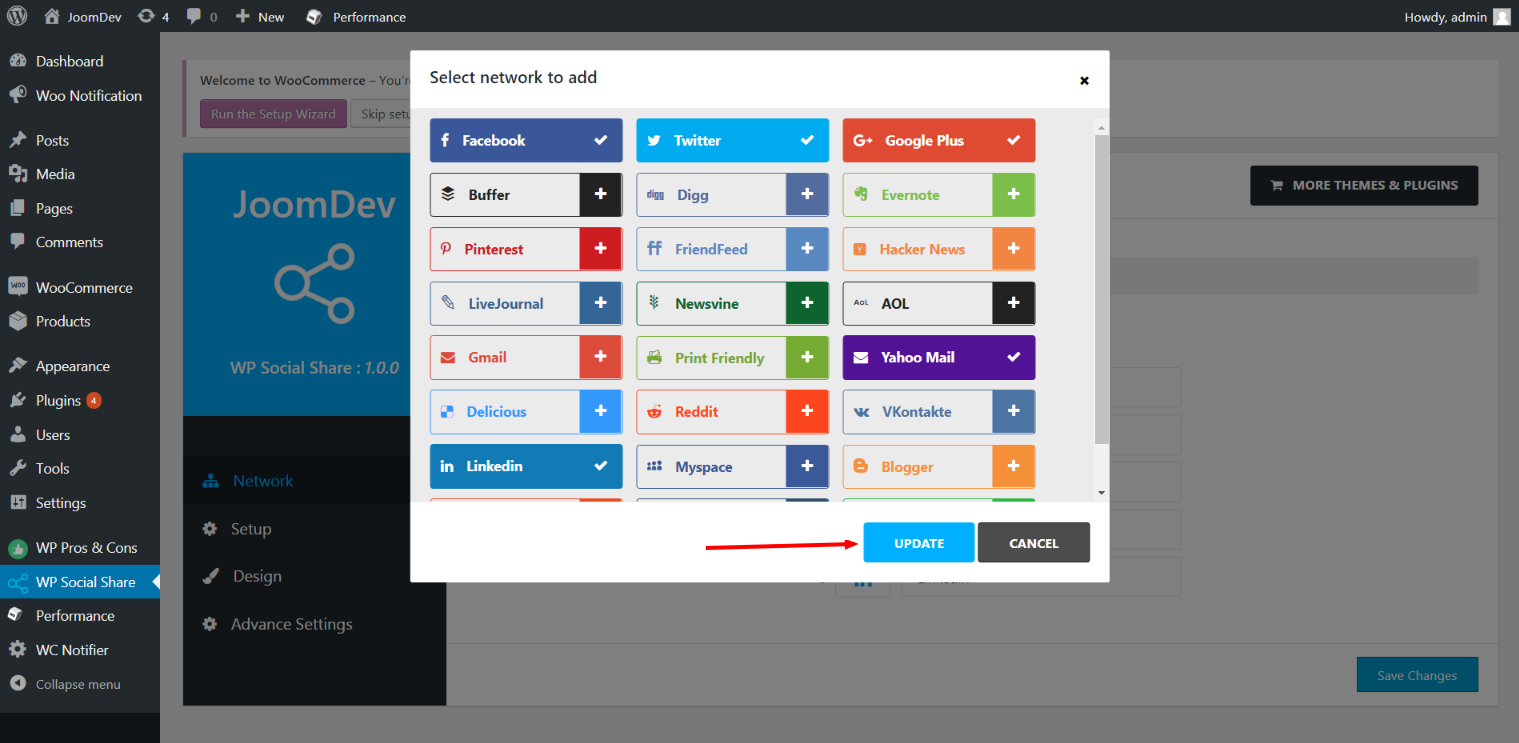
Click here to select networks
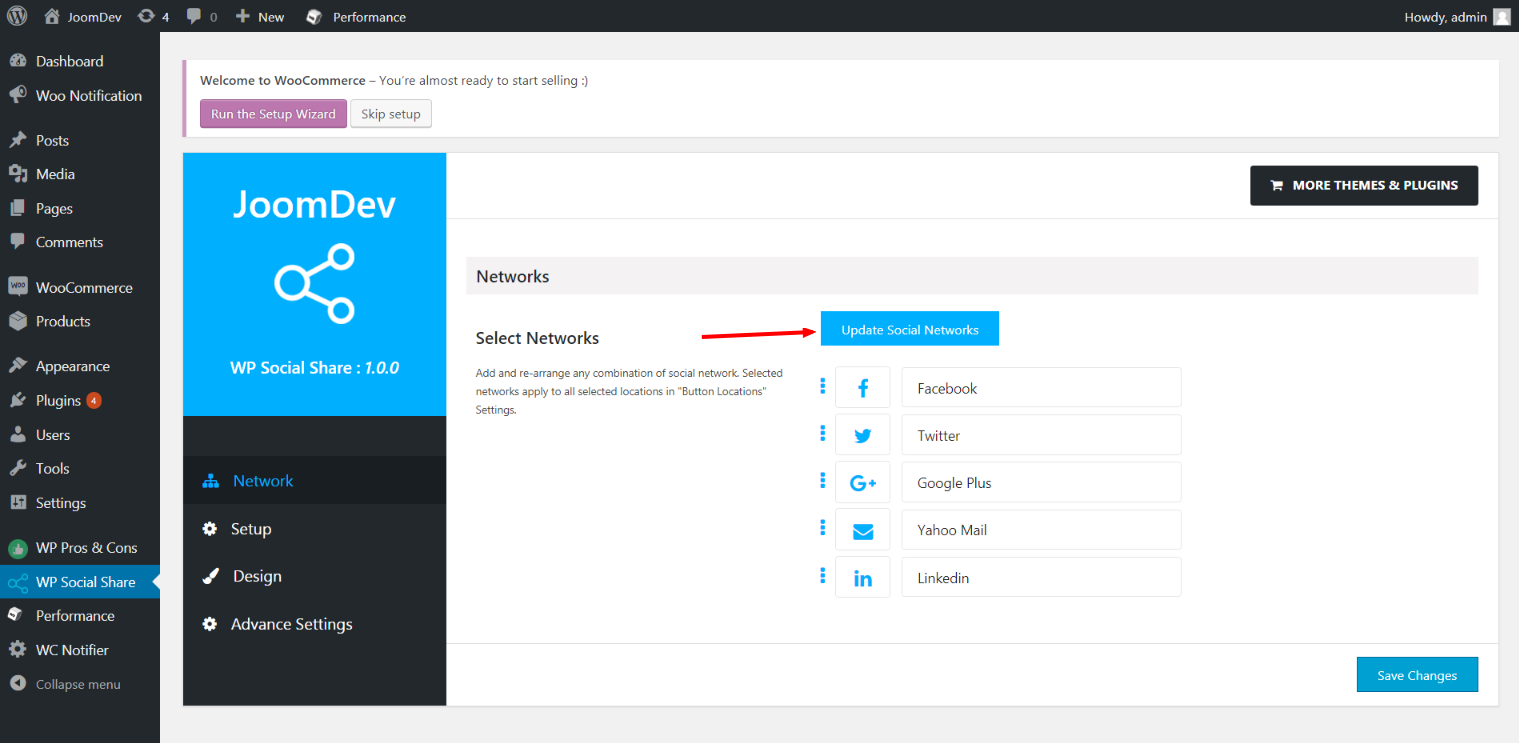
Update networks after selecting them.
Setup plugin and api settings.
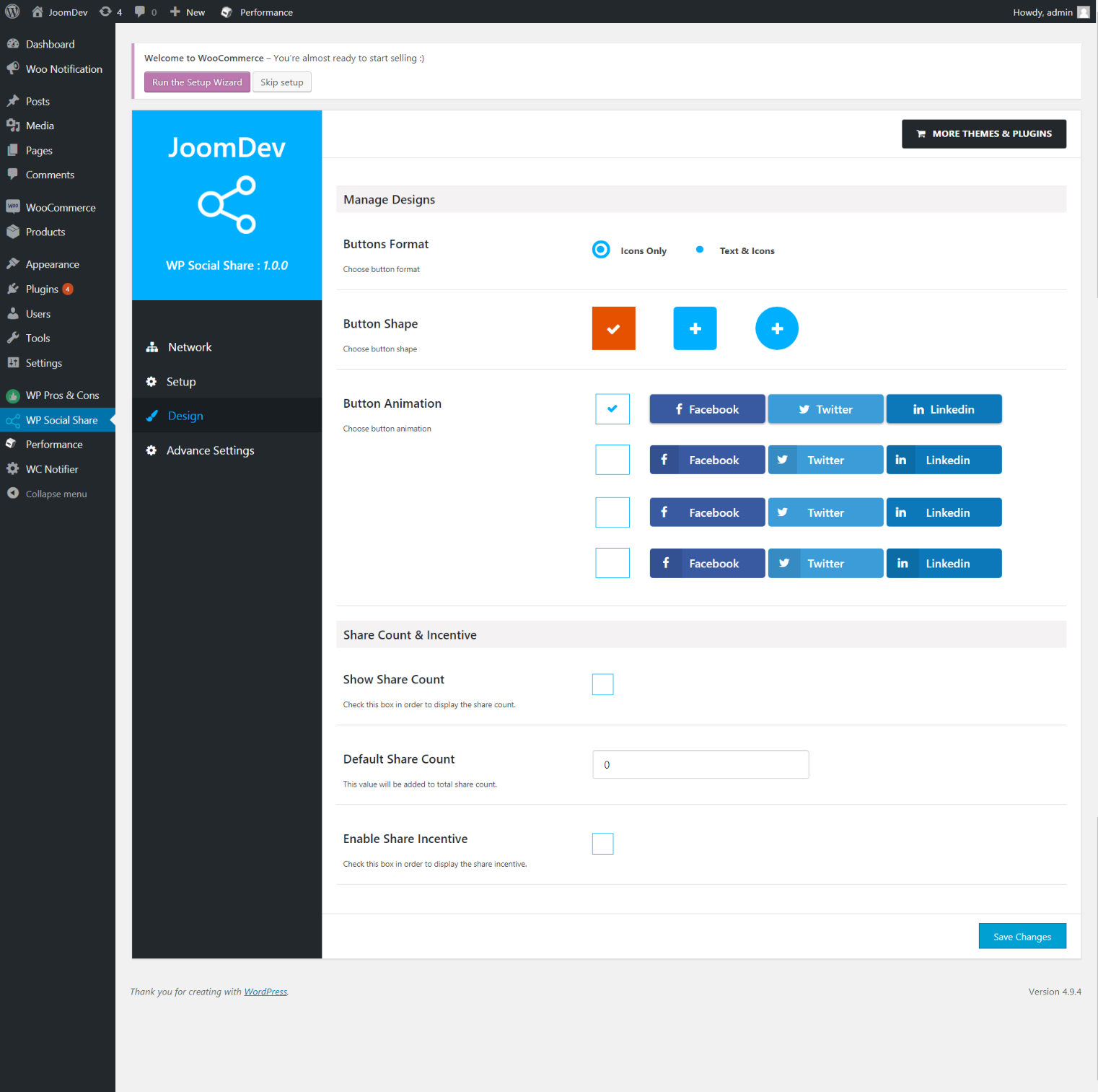
Select any design to display the buttons.
For mobile
For mobile

დაყენება

Way 1: 1. Upload joomdev-wp-social-share.zip to the /wp-content/plugins/ directory 2. Extract the zip file. 3. Activate the plugin from wordpress plugins page. And you have done.

Way 2: 1. Go to plugins page in admin. 2. Click on Add New button. 3. Search for “WP ShareX”. 4. Click install on WP Social Share. 5. Activate the plugin.

ხდკ

Installation Instructions

Way 1:
1. Upload joomdev-wp-social-share.zip to the /wp-content/plugins/ directory
2. Extract the zip file.
3. Activate the plugin from wordpress plugins page. And you have done.

Way 2:
1. Go to plugins page in admin.
2. Click on Add New button.
3. Search for “WP ShareX”.
4. Click install on WP Social Share.
5. Activate the plugin.

How do I use this plugin?

See description.

მიმოხილვები

Excellent!

Arnab Mohapatra 16.03.2018 1 reply
Incredible plugin. It allows to add any sharing button on the page simply and fast!
1 რევიუს წაკითხვა

მონაწილეები & დეველოპერები

“WP ShareX” ღია პროგრამული უზრუნველყოფაა. შემდეგმა ადამიანებმა წვილი შეიტანეს მის განვითარებაში.

მონაწილეები
  • joomdev

გადათარგმნეთ WP ShareX თქვენს ენაზე.

დაინტერესებული ხართ დეველოპმენტით?

დაათვალიერეთ კოდი, შეამოწმეთ SVN რეპო, ან გამოიწერეთ შექმნის ჟურნალი : RSS.

ცვლილებები

1.0.0

  • New Plugin initialized.

მეტა

  • Version 1.0.0
  • Last updated 8 წელი წინ
  • Active installations 10+
  • WordPress version 3.0, ან უფრო მაღალი
  • Tested up to 4.9.29
  • Language
    English (US)
  • Tags
    sharesocialsocial share
  • დამატებითი ხედი

რეიტინგები

5 out of 5 stars.
  • 1 5-star review 5 stars 1
  • 0 4-star reviews 4 stars 0
  • 0 3-star reviews 3 stars 0
  • 0 2-star reviews 2 stars 0
  • 0 1-star reviews 1 star 0

Your review

See all reviews

მონაწილეები

  • joomdev

მხარდაჭერა

გაქვთ კომენტარი? გჭირდებათ დახმარება?

მხარდაჭერის ფორუმის ნახვა

შემოწირულობა

გსურთ ამ ჩადგმის განვითარების მხარდაჭერა?

შეწირეთ თანხა ამ ჩადგმას

  • About
  • News
  • Hosting
  • Privacy
  • Showcase
  • Themes
  • Plugins
  • Patterns
  • Learn
  • Support
  • Developers
  • WordPress.tv ↗
  • Get Involved
  • Events
  • Donate ↗
  • Five for the Future
  • WordPress.com ↗
  • Matt ↗
  • bbPress ↗
  • BuddyPress ↗
WordPress.org
WordPress.org

საქართველო

  • Visit our X (formerly Twitter) account
  • Visit our Bluesky account
  • Visit our Mastodon account
  • Visit our Threads account
  • Visit our Facebook page
  • Visit our Instagram account
  • Visit our LinkedIn account
  • Visit our TikTok account
  • Visit our YouTube channel
  • Visit our Tumblr account
კოდი პოეზიაა.
The WordPress® trademark is the intellectual property of the WordPress Foundation.