

აღწერა
Easily display WordPress Gutenberg Editor saved reusable blocks anywhere via widget.
Easy Setup
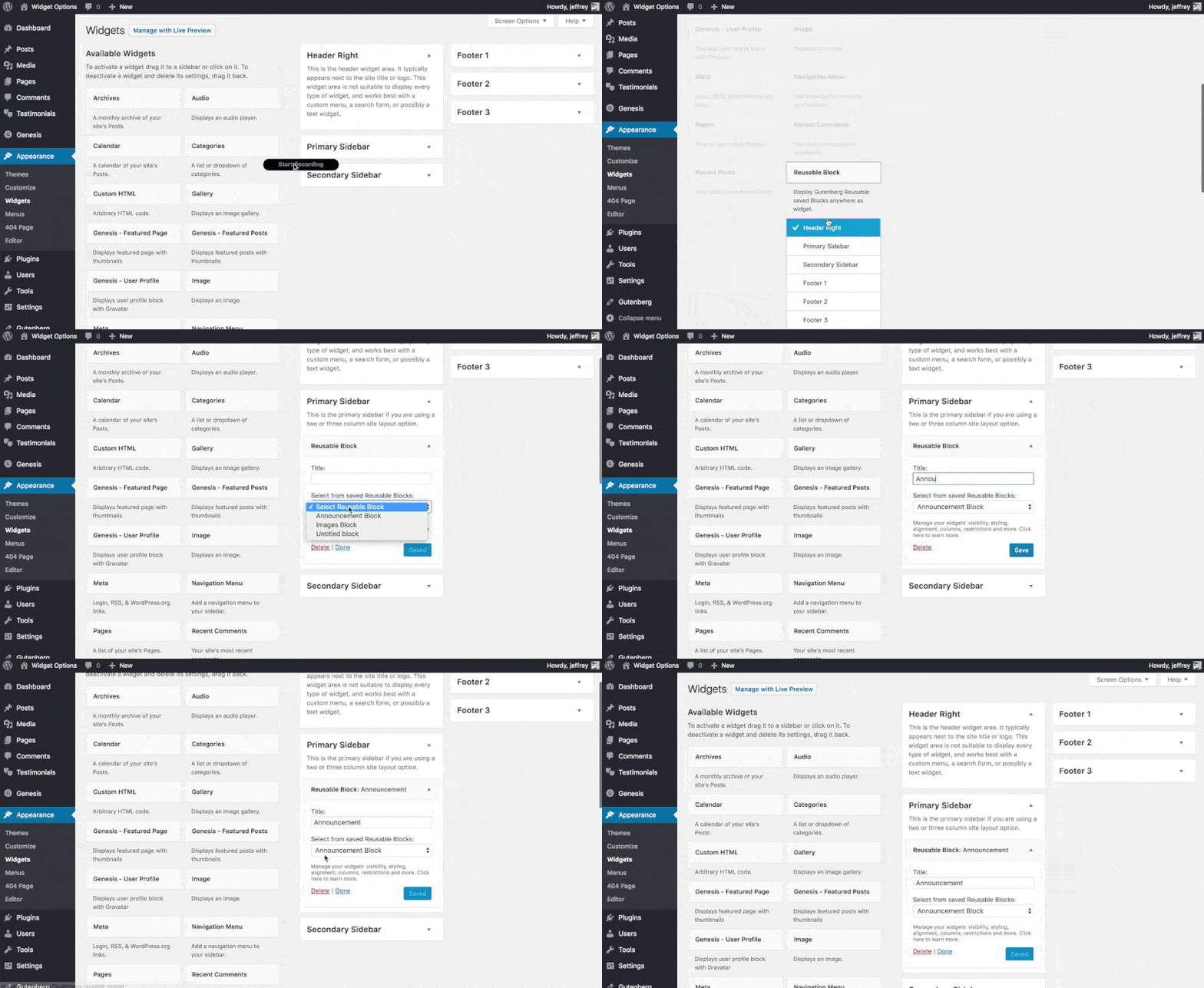
After plugin activation, Reusable Block widget will be available under Appearance > Widgets, just drag and drop to any desired widget area.
Extensible
If you want to upgrade your widgets usage. You can use Modal Pop-up & Sliding Widget Options to display your widgets as modal pop-ups, slide-ins and/or sliding widgets. Powered with triggers like exit-intent, on load and on scroll you can increase your user engagement easily.
ეკრანული სურათები
დაყენება
- Upload the full directory into your wp-content/plugins directory
- Activate the plugin at the plugin administration page
- Go to Appearance > Widgets then drag and drop “Reusable Block” to any widget area
ხდკ
- Installation Instructions
-
- Upload the full directory into your wp-content/plugins directory
- Activate the plugin at the plugin administration page
- Go to Appearance > Widgets then drag and drop “Reusable Block” to any widget area
მიმოხილვები


მონაწილეები & დეველოპერები
“Reusable Gutenberg Blocks Widget” ღია პროგრამული უზრუნველყოფაა. შემდეგმა ადამიანებმა წვილი შეიტანეს მის განვითარებაში.
მონაწილეები
გადათარგმნეთ Reusable Gutenberg Blocks Widget თქვენს ენაზე.
დაინტერესებული ხართ დეველოპმენტით?
დაათვალიერეთ კოდი, შეამოწმეთ SVN რეპო, ან გამოიწერეთ შექმნის ჟურნალი : RSS.