
აღწერა
If you have already familiar with the Categories widget, then You are already familiar with it too.
It just lets you choose any taxonomy you have in your blog, for example, Tags, custom taxonomy ( Eg: Location, Product Categories, Product Tags etc… ).
ეკრანული სურათები
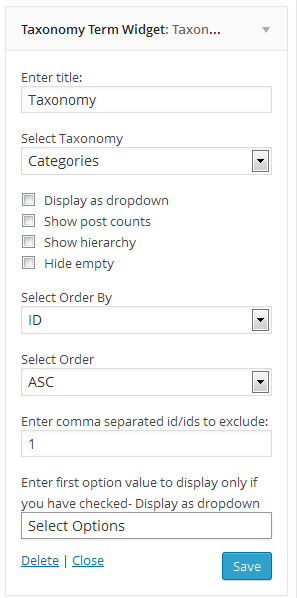
დაყენება
- log in to admin panel, Go to Plugins => Add New.
- Search for “Taxonomy Term Widget” and install it.
- Once you install it, activate it
- Go to Appearance => Widgets, Taxonomy Term Widget is waiting for you
Or
- Put the plug-in folder into [wordpress_dir]/wp-content/plugins/
- Go into the WordPress admin interface and activate the plugin
- Go to widgets under Appearance Menu Taxonomy Term Widget is waiting for you
Have fun!!!

მონაწილეები & დეველოპერები
“Taxonomy Term Widget” ღია პროგრამული უზრუნველყოფაა. შემდეგმა ადამიანებმა წვილი შეიტანეს მის განვითარებაში.
მონაწილეები


გადათარგმნეთ Taxonomy Term Widget თქვენს ენაზე.
დაინტერესებული ხართ დეველოპმენტით?
დაათვალიერეთ კოდი, შეამოწმეთ SVN რეპო, ან გამოიწერეთ შექმნის ჟურნალი : RSS.
ცვლილებები
2.3.5 – 2024-11-12
- Updated : Latest version test
2.3.4 – 2024-04-07
- Updated : Latest version test
2.3.2 – 2022-01-05
- Updated : Latest version test
2.3.1 – 2020-05-03
- Updated : Latest version test
2.3 – 2020-05-03
- Updated : Latest version test
- Added : Contributor
2.2
- Bug fix
2.1
- Bug fix
2.0
- Bug fix major release
1.0
- Initial version