
აღწერა
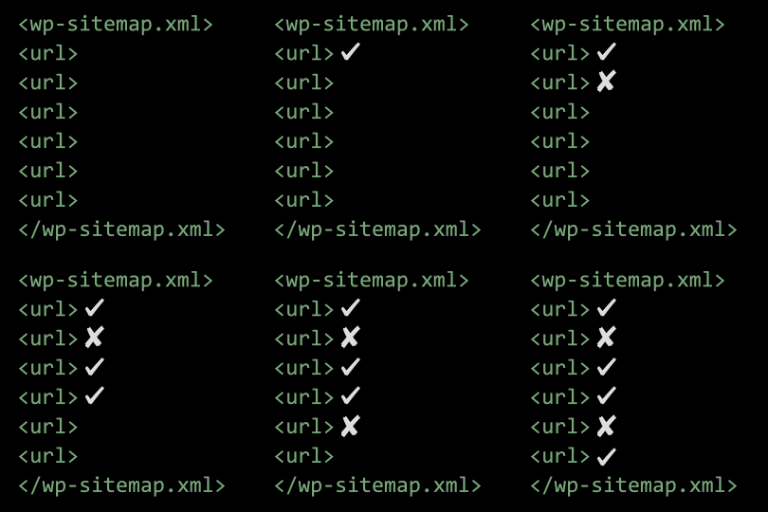
Native Sitemap Customizer gives you complete control over the native WordPress XML sitemap (wp-sitemap.xml) introduced in WordPress 5.5, without requiring a full SEO plugin.
Features
- Lastmod Dates: Adds last modification dates to every URL in the sitemap and to every entry in the sitemap index (Google’s most used optional field)
- Exclude Post Types: Remove any custom post type from the sitemap
- Exclude Taxonomies: Control which taxonomies appear in the sitemap
- User Control: Exclude specific user roles, individual users, or disable the entire users sitemap for single-author sites
- Flexible Exclusions: Exclude posts/pages by ID or by slug patterns
- SEO Plugin Integration: Auto-exclude noindex content from Yoast, Rank Math, AIOSEO, SEOPress, The SEO Framework, NoIndexer, Slim SEO, SureRank
- Smart Redirects: Automatically redirect old sitemap URLs from SEO and sitemap plugins (Yoast, Rank Math, AIOSEO, SEOPress, Google XML Sitemaps, XML Sitemap & Google News, Dynamic XML Sitemaps Generator for Google, Sitemap by BestWebSoft, Jetpack) to the native WordPress sitemap (301)
- Performance: Customize the maximum number of URLs per sitemap (1-50,000)
- Conflict Detection: Warns you if SEO plugins are active or indexing is disabled
- Clean Interface: Two-column layout for easy navigation and configuration
- Clean Uninstall: All plugin data is removed from the database when the plugin is deleted
Perfect For
- Sites that don’t need a full SEO plugin
- Developers who want full control over every sitemap detail
- Anyone looking to optimize their WordPress native sitemap
- Sites using headless WordPress or custom SEO solutions
Requirements
- WordPress 5.5 or higher (when native sitemaps were introduced)
- PHP 7.4 or higher
How It Works
Native Sitemap Customizer works by applying filters to WordPress’s built-in sitemap functionality. It doesn’t generate its own sitemap – it simply controls what appears in the native wp-sitemap.xml that WordPress creates.
Do you really need a full SEO plugin?
Most WordPress sites don’t need a 100-feature SEO plugin just to manage a sitemap or set noindex rules. WordPress already generates a native sitemap and a robots.txt file — the two core pieces search engines need to crawl your site properly.
Native Sitemap Customizer handles the sitemap side: decide what content appears in your XML sitemap. For noindex control, NoIndexer lets you mark entire post types or individual posts as noindex without any bloat. Together with the robots.txt that WordPress generates automatically, you have everything essential for technical SEO — no bloat, no unused features, no performance overhead.
Important Notes
- If you have an SEO plugin active (Yoast, Rank Math, etc.), you should disable their sitemap functionality to avoid conflicts
- The plugin will warn you if search engine indexing is disabled in WordPress Reading Settings
- Changes take effect immediately – your sitemap is dynamically generated
Complements the AyudaWP ecosystem
Designed to work alongside the rest of the Native SEO Suite and other AyudaWP plugins:
- Native SEO Meta Tags — automatic title, meta description, Open Graph, Twitter Card and JSON-LD schema.
- Native SEO NoIndexer — noindex and nofollow control per post, taxonomy, archive and feed.
- VigIA — AI visibility, crawler analytics, Site Identity JSON-LD.
- AI Share & Summarize — social and AI sharing buttons.
- SEO Read More Buttons — customized read-more links.
Support
Need help or have suggestions?
Love the plugin? Please leave us a 5-star review and help spread the word!
About AyudaWP
We are specialists in WordPress security, SEO, AI and performance optimization plugins. We create tools that solve real problems for WordPress site owners while maintaining the highest coding standards and accessibility requirements.
Privacy
This plugin does not collect or store any personal data. It only modifies which URLs appear in your public sitemap.
ეკრანული სურათები

Native Sitemap settings page 
Post types selection options 
Taxonomies selection options 
User role exclusion options 
Post exclusions per ID or Slug options 
Term exclusions per ID or Slug options 
Advanced settings
დაყენება
- Upload the plugin files to
/wp-content/plugins/native-sitemap-customizer/or install through WordPress plugins screen - Activate the plugin through the ‘Plugins’ screen in WordPress
- Go to Settings > Sitemap to configure your sitemap options
- Submit your sitemap to Google Search Console and Bing Webmaster Tools
ხდკ
-
Does this plugin create its own sitemap?
-
No. This plugin manages the native WordPress sitemap (wp-sitemap.xml) that WordPress generates automatically since version 5.5.
-
What are lastmod dates and why do they matter?
-
Lastmod dates tell search engines when a URL was last modified. Google has explicitly stated this is the only optional sitemap field they actively use to prioritize crawling. WordPress core supports this field but doesn’t populate it by default – our plugin fills that gap.
-
Will this conflict with my SEO plugin?
-
Old sitemap URLs from SEO plugins (like sitemap.xml, sitemap_index.xml, post-sitemap.xml, etc.) are automatically redirected to the native WordPress sitemap using 301 permanent redirects. This ensures search engines update their indexes and you don’t lose any SEO value during the migration. However, we strongly recommend disabling the sitemap functionality in your SEO plugin to avoid unnecessary code execution, database queries, and potential redirect loops if the SEO plugin tries to redirect the native sitemap to its own.
-
What about content marked as noindex in my SEO plugin?
-
The plugin can automatically detect and exclude posts and taxonomy terms marked as noindex by popular SEO plugins (Yoast SEO, Rank Math, All in One SEO, SEOPress, The SEO Framework, Slim SEO, SureRank) and by NoIndexer. This feature is enabled by default in Advanced Settings and ensures your sitemap only includes content you actually want indexed by search engines.
-
Where is my sitemap located?
-
Your sitemap is available at:
https://yourdomain.com/wp-sitemap.xml -
Can I change the sitemap URL?
-
No, WordPress uses a fixed URL structure for its native sitemap. This is intentional to maintain compatibility and standards.
-
How do I submit my sitemap to search engines?
-
Submit your sitemap manually to Google Search Console (https://search.google.com/search-console) and Bing Webmaster Tools (https://www.bing.com/webmasters). Automatic ping services are no longer supported by major search engines as of 2023.
-
Why are my changes not appearing?
-
WordPress may cache the sitemap. Try clearing your cache plugin (if any) and test in an incognito browser window. Changes take effect immediately in the WordPress core.
-
Can I exclude specific posts?
-
Yes! You can exclude posts by ID (enter one ID per line) or by slug patterns (any post containing that text in its slug will be excluded).
-
Can I exclude specific taxonomy terms?
-
Yes! You can exclude taxonomy terms by ID (enter one ID per line) or by slug patterns (any taxonomy term containing that text in its slug will be excluded).
-
What’s the recommended maximum URLs setting?
-
The default of 1,000 URLs per sitemap is recommended for most sites. Lower values can improve performance on large sites. The maximum allowed by the sitemap protocol is 50,000.
-
What happens when I delete the plugin?
-
All plugin settings and data are completely removed from your database. Your WordPress native sitemap will continue to work with default settings.
მიმოხილვები


მონაწილეები & დეველოპერები
“Native SEO Sitemap Customizer” ღია პროგრამული უზრუნველყოფაა. შემდეგმა ადამიანებმა წვილი შეიტანეს მის განვითარებაში.
მონაწილეები

“Native SEO Sitemap Customizer” ითარგმნა 2 ენაზე. გმადლობთ თარჯიმნებო თქვენი წვლილისათვის.
გადათარგმნეთ Native SEO Sitemap Customizer თქვენს ენაზე.
დაინტერესებული ხართ დეველოპმენტით?
დაათვალიერეთ კოდი, შეამოწმეთ SVN რეპო, ან გამოიწერეთ შექმნის ჟურნალი : RSS.
ცვლილებები
1.8.1
- Improved: the “Native SEO Suite detected” card now shows the up-to-date plugin names for the family (Native SEO Meta Tags, Native SEO NoIndexer) and a unified
dashicons-embed-genericicon for the three suite plugins. The card text is now fully translatable.
1.8.0
- New: renamed to Native SEO Sitemap Customizer as part of the Native SEO Suite (with Native SEO Meta Tags and Native SEO NoIndexer). Same plugin, same settings, same WordPress.org slug — only the display name changes.
- New: shared Native SEO Core library bundled with the plugin. Adds a cross-promo banner with other AyudaWP plugins and a “Native SEO Suite detected” card on the settings page when another family plugin is active, with quick links between them.
- Improved: unified visual identity across the Native SEO Suite — settings menu label shortened to
<> Sitemap, settings page icon set todashicons-embed-generic, plus shared CSS tokens (brand colors, accent backgrounds) bundled in the core library. - Improved: in-page detection notices (Search Engine Visibility disabled, SEO plugin detected) restyled as discreet contextual cards instead of full-width yellow/red banners.
- Improved: cross-promo banner now automatically excludes other Native SEO Suite plugins from rotation when they are already active, so you only see recommendations for things you do not already have installed.
For older changelog entries, please check the changelog.txt file