აღწერა
This plugin allows you to make multiple front end eCommerce websites with WordPress and WooCommerce, from just a single, simple installation of WordPress.
Suppose you have a WordPress site example.com. It contains 100 products. You want to show some of them on garments.example.com, some on my-eshop.com and some products on mobiles.example.com. See? you can show your WooCommerce products across multiple subdomains and even on separate domains.
How to do it? Very simple. To setup a new subdomain for example, mobiles.example.com, do the following:
-
Install this plugin and activate it.
-
Point mobiles.example.com to your main website server. This may require changing of DNS records. On many hosting providers this process is called creating a “Domain Alias” or Add-on domain. The target is that if you browse your new domain or subdomain, it should show the content as you see on your main site.
-
Create a new ‘Contributor’ type user.
-
Put https://mobiles.example.com in his site url field and save.
-
Now, go in Products and set that author to those products in WooCommerce, which you want to show on mobiles.example.com.
-
That’s it. Now browse https://mobiles.example.com and you will see products made by the contributor user of this site.
For more information or support, you can contact us at
https://codingmall.com/contact-us
MORE FEATURES:
If you want to create a true Multistore, multi-vendor experience and if you want more features, please have a look here;
https://codingmall.com/wordpress/203-multi-sites-for-wordpress-and-woocommerce
Premium version features heighlights:
- Sharing of posts and products on different domains
- Show a different page on home page
- Setting up WordPress differently for each site. For example, different permalink style for each website
- Having a different theme for each domain or subdomain
- Showing different menus on each site
- Providing different Widgets on different sites
- Showing different WooCommerce products on each store or vendor site to have a multistore platform where different domains or subdomains showing completely different websites (or similar ones if you want).
- Different WooCommerce settings for each store. For example, different shipping and tax rates for each store.
and many many more…
ეკრანული სურათები
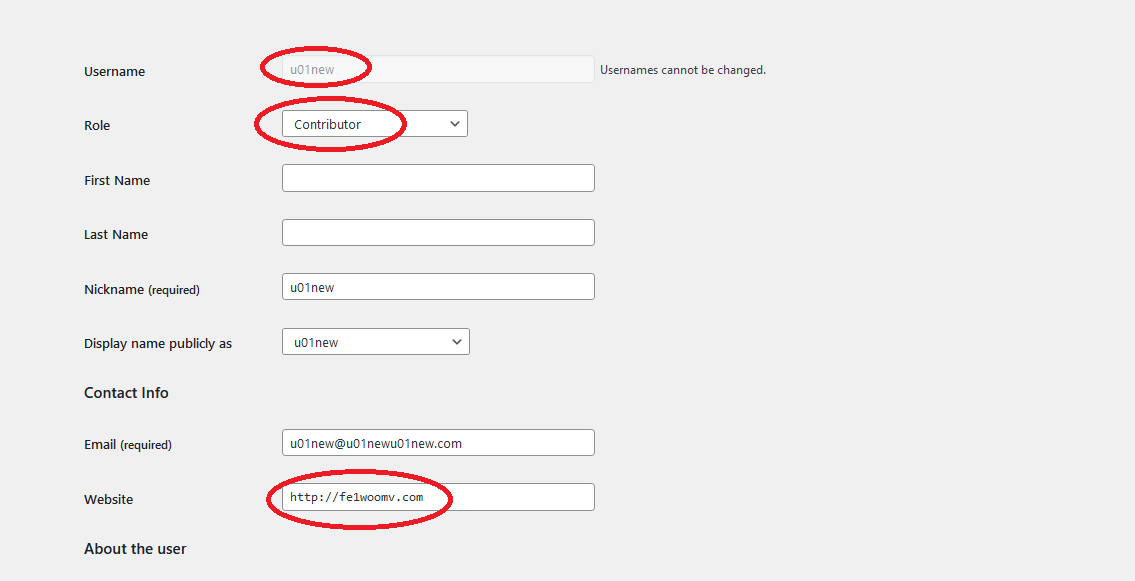
This is the screenshot of the user details. Products which will have this user set as author, will be shown on our example domain fe1woomv.com (shown in the image). You need to create one user for each front end domain and subdomain.
დაყენება
- Upload plugin directory to the
/wp-content/plugins/directory. - Activate the plugin through the ‘Plugins’ screen in WordPress.
ხდკ
- Do I need to edit my theme files or any other WordPress core files?
Ans. No. It works out of the box.
- Do I need to install WordPress in Multisite mode?
Ans. No. Just a single, simple WordPress is required.
მიმოხილვები
There are no reviews for this plugin.
მონაწილეები & დეველოპერები
“Multistore Multivendor” ღია პროგრამული უზრუნველყოფაა. შემდეგმა ადამიანებმა წვილი შეიტანეს მის განვითარებაში.
მონაწილეები
“Multistore Multivendor” ითარგმნა 4 ენაზე. გმადლობთ თარჯიმნებო თქვენი წვლილისათვის.
გადათარგმნეთ Multistore Multivendor თქვენს ენაზე.
დაინტერესებული ხართ დეველოპმენტით?
დაათვალიერეთ კოდი, შეამოწმეთ SVN რეპო, ან გამოიწერეთ შექმნის ჟურნალი : RSS.